Case study
03
Automotive Infotainment UX Evaluation
Automotive Infotainment UX Evaluation
Introduction
Automotive Infotainment UX Evaluation
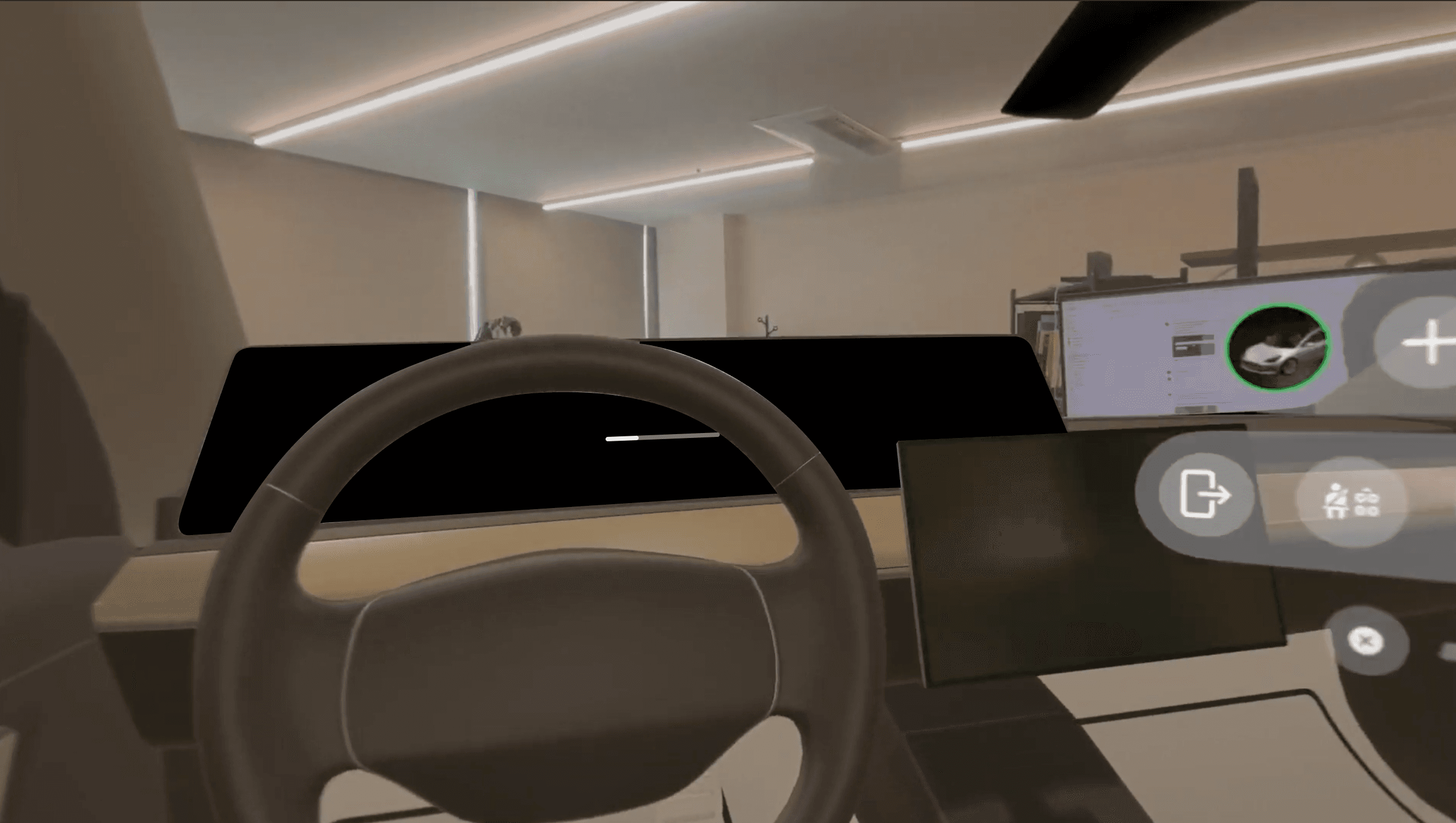
This project focuses on evaluating the usability and interaction flow of an automotive infotainment system within a simulated digital environment.
By recreating real driving scenarios and interface behaviors, the evaluation uncovers UX strengths and improvement areas before physical integration.
This project focuses on evaluating the usability and interaction flow of an automotive infotainment system within a simulated digital environment.
By recreating real driving scenarios and interface behaviors, the evaluation uncovers UX strengths and improvement areas before physical integration.
This project focuses on evaluating the usability and interaction flow of an automotive infotainment system within a simulated digital environment.
By recreating real driving scenarios and interface behaviors, the evaluation uncovers UX strengths and improvement areas before physical integration.
Introduction
Client
Automotive OEM / Infotainment Development Team
Automotive OEM / Infotainment Development Team
Needs
Use Case
Use Case

HMI Usability Testing
Test human-machine interfaces under realistic driving conditions to ensure intuitive usability.
HMI Usability Testing
Test human-machine interfaces under realistic driving conditions to ensure intuitive usability.
HMI Usability Testing
Test human-machine interfaces under realistic driving conditions to ensure intuitive usability.

In-Vehicle Interaction Assessment
Analyze in-vehicle interactions based on driver behavior, including menu structure, task flow, and response timing.
In-Vehicle Interaction Assessment
Analyze in-vehicle interactions based on driver behavior, including menu structure, task flow, and response timing.
In-Vehicle Interaction Assessment
Analyze in-vehicle interactions based on driver behavior, including menu structure, task flow, and response timing.

Touch & Gesture UX Validation
Evaluate the responsiveness and accuracy of touch and gesture inputs to ensure a natural, error-free UX even in real driving conditions.
Touch & Gesture UX Validation
Evaluate the responsiveness and accuracy of touch and gesture inputs to ensure a natural, error-free UX even in real driving conditions.
Touch & Gesture UX Validation
Evaluate the responsiveness and accuracy of touch and gesture inputs to ensure a natural, error-free UX even in real driving conditions.

Information Architecture Review
Analyze screen layout and information hierarchy to improve infotainment structure for fast and clear information recognition while driving.
Information Architecture Review
Analyze screen layout and information hierarchy to improve infotainment structure for fast and clear information recognition while driving.
Information Architecture Review
Analyze screen layout and information hierarchy to improve infotainment structure for fast and clear information recognition while driving.

Driver Distraction Analysis
Evaluate the impact of interface use on driver attention and cognitive load to minimize distraction.
Driver Distraction Analysis
Evaluate the impact of interface use on driver attention and cognitive load to minimize distraction.
Driver Distraction Analysis
Evaluate the impact of interface use on driver attention and cognitive load to minimize distraction.
Technology


Figma-to-Prototype Integration
Figma-to-Prototype Integration

ProtoPie Interaction Playback
ProtoPie Interaction Playback

Unity-based Simulation
Unity-based Simulation

Touch & Motion Input Capture
Touch & Motion Input Capture

Vision Pro/3D Interface Testing
Vision Pro/3D Interface Testing

About
A key advantage of this evaluation process is the seamless integration of Figma designs and ProtoPie interactive prototypes via direct links, enabling rapid import and instant testing of new UX iterations.
This allows designers and engineers to validate menu flows, gestures, and visual hierarchy in a realistic automotive environment without rebuilding assets from scratch.
A key advantage of this evaluation process is the seamless integration of Figma designs and ProtoPie interactive prototypes via direct links, enabling rapid import and instant testing of new UX iterations.
This allows designers and engineers to validate menu flows, gestures, and visual hierarchy in a realistic automotive environment without rebuilding assets from scratch.
A key advantage of this evaluation process is the seamless integration of Figma designs and ProtoPie interactive prototypes via direct links, enabling rapid import and instant testing of new UX iterations.
This allows designers and engineers to validate menu flows, gestures, and visual hierarchy in a realistic automotive environment without rebuilding assets from scratch.
Business Impact
The ability to link design tools directly into the XR simulation dramatically shortens UX validation cycles and reduces engineering workload.
As a result, teams can detect usability issues earlier, refine interactions more efficiently, and deliver a safer, more intuitive infotainment experience that strengthens overall product competitiveness.
Business Impact
The ability to link design tools directly into the XR simulation dramatically shortens UX validation cycles and reduces engineering workload.
As a result, teams can detect usability issues earlier, refine interactions more efficiently, and deliver a safer, more intuitive infotainment experience that strengthens overall product competitiveness.
Byond R Inc.
23000 w 6th st ste 209 Los Angeles, CA 90020
sales@byond-r.com | (213) 249-1905
© 2025 Byond R lnc. All rights reserved
Byond R Inc.
23000 w 6th st ste 209 Los Angeles, CA 90020
sales@byond-r.com | (213) 249-1905
© 2025 Byond R lnc. All rights reserved
Byond R Inc.
23000 w 6th st ste 209 Los Angeles, CA 90020
sales@byond-r.com | (213) 249-1905
© 2025 Byond R lnc. All rights reserved